

Table of Contents
VNC stands for Virtual Network Computing. It is a remote desktop technology that lets you view and control another computer's screen over a network, using your own keyboard and mouse as if you were sitting in front of that machine.
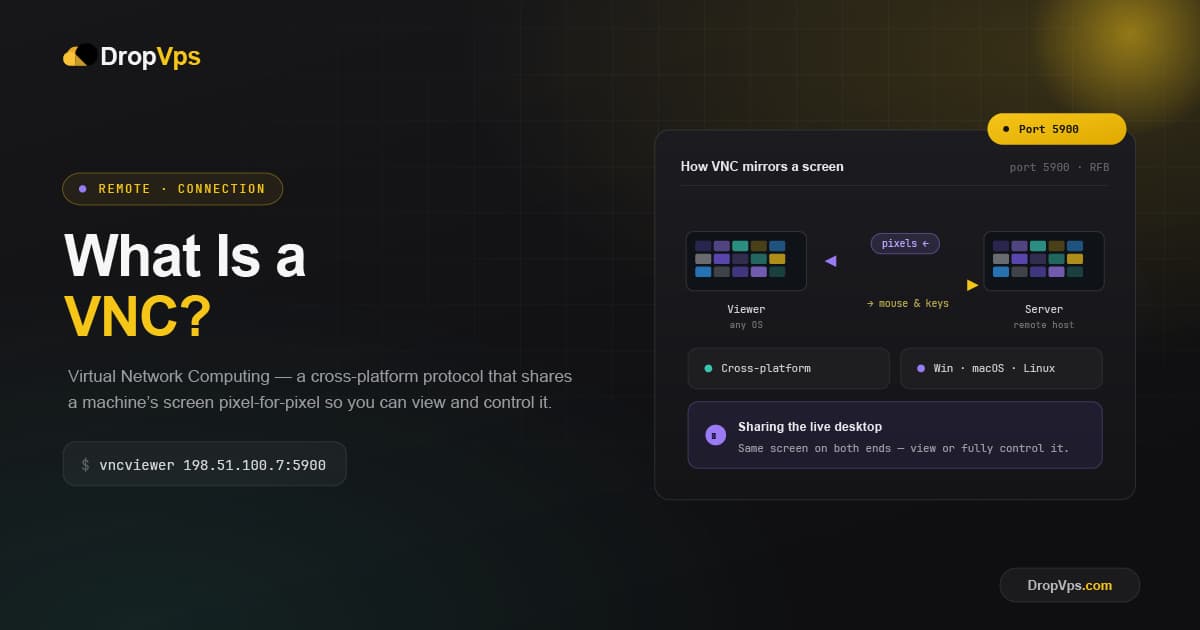
VNC is a graphical desktop-sharing system that uses the Remote Frame Buffer (RFB) protocol to remotely control another computer, transmitting keyboard and mouse input while relaying graphical screen updates over the network. It is platform-independent, so a Windows machine can control a Linux server, and a phone can control a desktop.
How VNC Works
VNC works on a client/server model. A server component is installed on the remote computer you want to control, and a VNC viewer, or client, is installed on the device you want to control from. Once connected, the server transmits the remote screen to the viewer in real time.
The server transmits keyboard and mouse input from the client back to the remote machine, while continuously sending screen updates in the opposite direction. Rather than streaming a constant video feed, VNC is smarter about bandwidth.
RFB treats the screen as a grid of smaller regions, and when a region changes, only that changed region is retransmitted instead of the entire screen.
Every VNC session relies on three parts:
VNC Server   - installed on the remote machine you want to access
VNC Viewer   - installed on the device you connect from
RFB Protocol - handles screen updates and input between server and viewer
By default, most VNC servers listen on port:
5900Is VNC Secure?
Basic VNC does not encrypt data by default, which can make it vulnerable on unsecured networks, though secure versions and tunneling through SSH or VPN can significantly improve protection.
Common ways to secure a VNC connection include:
Strong, unique server password
SSH tunneling for the connection
VPN access instead of exposing port 5900 publicly
TLS encryption (supported by some modern VNC variants)
Firewall rules restricting access by IP
Common Uses for VNC
Because VNC works across operating systems and doesn't require specialized hardware, it's used in a wide range of scenarios:
Remote IT support and troubleshooting
System administration on headless servers
Accessing virtual machines without a display
Accessing a work computer from home (or vice versa)
Managing cloud VPS instances through a browser-based console
Remote access to lab or classroom computers
Cloud hosting providers commonly offer a built-in VNC console as a fallback way to access a Linux VPS or Windows VPS directly through the browser, which is especially useful if normal SSH or remote desktop access is unavailable, for example while configuring network settings or recovering from a misconfiguration.
Popular VNC Software
VNC's open-source foundation has led to several variants, both open-source and commercial, including RealVNC, TightVNC, UltraVNC, and TigerVNC, which remain compatible with each other through the RFB protocol.
RealVNC  - commercial, widely used, strong encryption options
TightVNC - lightweight, open-source, popular on Windows
TigerVNC - open-source, supports TLS encryption natively
UltraVNC - open-source, Windows-focused, includes extra features
Related Guide
Linux VPS Hosting PlansGet a Linux VPS with browser-based VNC console access included for full server control.
VNC remains one of the simplest ways to view and control a remote computer's desktop, and it's especially valuable for cross-platform access and managing servers that don't have a physical display attached.
Follow DropVPS on Google
Add DropVPS as a preferred source to see our latest VPS guides and tutorials surfaced first in Google Search and AI Overviews.
Need Remote Desktop Access?
DropVPS Admin RDP lets you access a full Windows desktop from anywhere — high-speed connection, dedicated IP, and instant deployment.
- Windows Desktop
- Dedicated IP
- High-Speed RDP
- Instant Setup
No commitment · Cancel anytime