

Table of Contents
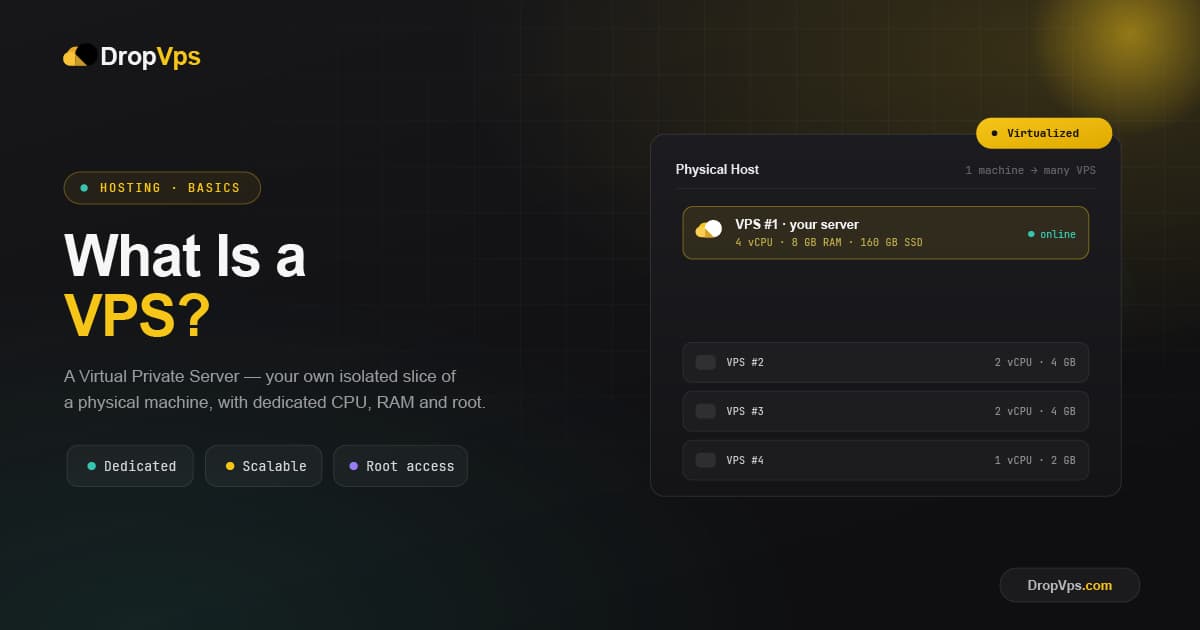
VPS stands for Virtual Private Server. It is a virtual machine that runs on a powerful physical server but behaves like its own independent server — with a dedicated operating system, dedicated resources, and full root or administrator access. In simple terms, a VPS gives you your own private slice of a real server that you fully control, without paying for an entire physical machine.
If you have outgrown shared hosting but a full dedicated server feels like too much, a VPS is the middle ground most people are looking for. This guide explains what a VPS is, how it works, how it compares to other hosting types, and what it is actually used for.
What Is a VPS?
A VPS is created when a hosting provider splits one physical server into several isolated virtual servers. Each virtual server runs separately, with its own operating system, its own reserved resources, and its own settings — even though several of them live on the same physical hardware.
The easiest way to picture it is an apartment building. Everyone shares the same building (the physical server), but each tenant has their own private, locked apartment (your VPS) with their own utilities (your CPU, RAM, and storage). What your neighbors do inside their apartments does not affect yours. That isolation is the core idea behind a Virtual Private Server.
This places a VPS neatly between two other options: shared hosting, where everyone competes for the same resources, and a dedicated server, where you rent an entire physical machine for yourself.
How Does a VPS Work?
The technology that makes a VPS possible is called virtualization. The provider installs a thin software layer called a hypervisor on the physical server. The hypervisor divides the machine's hardware — CPU cores, memory, storage, and bandwidth — into separate, walled-off compartments. Each compartment becomes one VPS.
When you buy a VPS, you are renting one of these compartments. From your side it looks and feels exactly like having your own server: you can reboot it, install software, and change settings freely. The hypervisor guarantees that the resources in your plan are reserved for you. If your plan includes 4 GB of RAM and 2 CPU cores, those are yours — even if dozens of other VPS instances share the same physical server, they cannot touch your share.
What You Get With a VPS
A few key features are what make a VPS different from cheaper shared hosting:
- Dedicated resources: Your CPU, RAM, and storage are reserved for you and are not shared with other users.
- Root / administrator access: You get full control to install any software and configure the server exactly how you want.
- Isolation: If another user's site is attacked or overloaded, your VPS keeps running normally.
- A dedicated IP address: Your VPS has its own IP, which helps with reliability and email delivery.
- Scalability: You can upgrade CPU, RAM, or storage as your project grows, usually without migrating to a new server.
VPS vs. Shared vs. Dedicated Hosting
Understanding where a VPS sits makes it much easier to know if it is right for you.
Shared hosting is the cheapest option. Hundreds of websites share one server's resources, so a traffic spike on someone else's site can slow yours down — the classic "noisy neighbor" problem. It is fine for a small blog or a simple personal site with little traffic.
VPS hosting gives you guaranteed resources and an isolated environment on a shared physical machine. You get much of the performance, control, and security of a dedicated server at a far lower price. It suits growing websites, online stores, and applications that need stable performance.
Dedicated hosting means renting an entire physical server for yourself. It offers maximum power and control, but it is the most expensive option and is usually overkill until you have very high traffic or strict requirements.
In short: a VPS delivers most of the benefits of a dedicated server without the dedicated-server price tag.
Managed vs. Unmanaged VPS
VPS plans usually come in two styles, and the difference matters a lot for beginners:
- Managed VPS: The provider handles setup, updates, security patches, and maintenance for you. This is the better choice if you do not want to manage a server yourself.
- Unmanaged VPS: You get full control, but you are responsible for everything — installing the operating system, securing it, and keeping it updated. This suits users with technical experience who want maximum freedom.
Linux VPS vs. Windows VPS
Every VPS runs an operating system, and you normally choose between Linux and Windows when you order. A Linux VPS is the most common choice for websites, apps, and servers thanks to its speed, lower cost, and huge community support. A Windows VPS is the right pick when you need Windows-only software, Remote Desktop, or tools like MS SQL Server and ASP.NET.
The way you connect reflects this choice. On a Linux VPS you usually connect over SSH from your terminal:
ssh root@your-server-ipOn a Windows VPS you connect through the built-in Remote Desktop client:
Start → Remote Desktop Connection → enter your VPS IP → ConnectRelated Guide
Windows VPS Hosting ExplainedSee when a Windows VPS is the better fit and how Remote Desktop access works.
What Is a VPS Used For?
Because a VPS gives you a real, controllable server, it fits a wide range of jobs:
- Hosting websites and web apps that have outgrown shared hosting.
- Running online stores that need fast, stable performance and stronger security.
- Development and testing environments that you can spin up and configure freely.
- Game servers, bots, and VPNs that need a stable, always-on connection.
- Forex and automated trading, where a Forex VPS keeps your trading platform running 24/7 with low latency, even when your home computer is off.
- Backups and storage for keeping important files in a secure, central location.
When Should You Move to a VPS?
It is usually time to upgrade to a VPS when:
- Your site loads slowly or goes down as traffic grows.
- You hit the limits of your shared hosting plan.
- You need to install custom software or specific configurations.
- You are launching a store or app where performance and security really matter.
- You want full control over your own server environment.
If any of these sound familiar, a VPS is the natural next step.
Closing Thoughts
A VPS gives you the control, performance, and isolation of a private server at a price that stays reasonable. It is the practical middle ground between shared hosting and a full dedicated server — powerful enough for serious projects, yet affordable enough to grow into. Once you know whether you need Linux or Windows and managed or unmanaged, choosing the right VPS becomes simple.
Follow DropVPS on Google
Add DropVPS as a preferred source to see our latest VPS guides and tutorials surfaced first in Google Search and AI Overviews.
Need Remote Desktop Access?
DropVPS Admin RDP lets you access a full Windows desktop from anywhere — high-speed connection, dedicated IP, and instant deployment.
- Windows Desktop
- Dedicated IP
- High-Speed RDP
- Instant Setup
No commitment · Cancel anytime